Your demand planning software is live. Your planning team has been trained. The integration with your Enterprise Resource Planning (ERP) system is running. And your forecasts are still off by the same margin they were when you were working in Excel.
This is not a technology problem. The tool is not broken. What is broken is the process surrounding it. Companies consistently deploy demand planning software and then use it exactly as they used their spreadsheets: as a single-planner input system that generates monthly numbers and a weekly report.
By the end of this guide, you will know the five specific changes that determine whether the platform generates measurable results or gathers dust.
| Most demand planning software fails not because of the tool. It fails because companies deploy it without fixing three things first: master data quality, collaborative forecasting ownership, and a defined S&OP cadence built around the software. These three changes determine whether the platform drives decisions or generates more spreadsheets. |
Why Demand Planning Software Delivers Less Than Expected
The results promised by demand planning software are well documented.
More than 70% of recently implemented ERP initiatives will fail to fully meet their original business case goals by 2027, with up to 25% failing outright (Source: Gartner).
The gap between what demand planning software promises and what most companies extract comes down to three failures that occur after the platform is deployed, not before:
- Master data fed into the system is unclean, inconsistent, or contaminated by one-off events that distort the historical baseline.
- The forecast is still owned by one planner rather than multiple functions contributing simultaneously.
- The demand plan stops at a spreadsheet export and never connects to production or procurement execution.
The Demand Planning Value Gap
| What the Software Promises | What Breaks the Promise in Practice |
|---|---|
| Forecast accuracy improvements | Dirty or inconsistent master data fed into the system before any algorithm runs |
| Cross-functional alignment | Forecast still owned by one planner who consolidates inputs manually from sales, finance, and operations |
| Exception management | Planners use the tool to generate monthly reports instead of acting on mid-cycle exception alerts |
| Execution connection | Demand plans stop at a spreadsheet export and never trigger production or procurement actions |
Named framework. The Demand Planning Value Gap maps the four most common failure points between deployment and measurable outcomes.
Step 1: Fix Master Data Before The Software Touches A Number
Demand planning software applies statistical algorithms to whatever data you give it.
The algorithms do not know that an April spike was a one-time promotional order, that two SKU codes in the item master refer to the same product, or that three months of demand history came from a spreadsheet maintained by a planner who left the company. The system processes all of it and produces a forecast that is precisely wrong.
Master data in the context of the demand planning process covers three categories: item master (SKU codes, units of measure, lead times, product hierarchy), customer master (customer hierarchy, channel mapping, regional groupings), and the historical demand baseline.
That baseline must reflect net demand after separating returns, cancellations, and promotional spikes from base consumption.
The three most common master data errors in mid-market manufacturing companies are:
- Duplicate or inconsistent SKU codes across the ERP module and the planning platform.
- Promotional demand included in the baseline, inflating the forecast signal for subsequent periods.
- Multiple Excel files serving as the source of truth, with no version control and no audit trail.
Most demand planning systems require at least 18 to 24 months of clean historical demand forecasting in supply chain data before their algorithms produce reliable output.
The data cleanup must happen before going live.
Before the platform is onboarded, complete this checklist:
- Standardize item codes across all source systems, including ERP modules and any auxiliary inventory or sales platforms.
- Separate promotional demand from baseline demand history across the full 24-month historical window.
- Define and lock the customer hierarchy before data import. Changes made post-onboarding require full reprocessing.
- Resolve all duplicate records across the ERP and any auxiliary systems.
- Validate historical demand data against actual shipments, not orders booked. Booked orders include cancellations that distort the baseline.
| Demand planning software applies precision algorithms to whatever data you feed it. If that data is messy, inconsistent, or contaminated by one-off events, the output is a mathematically precise version of the wrong number. Data cleanup is a must. Oritiq, AI-Powered Supply Chain Planning Platform |
Step 2: Build Collaborative Forecasting, Not Single-Planner Inputs
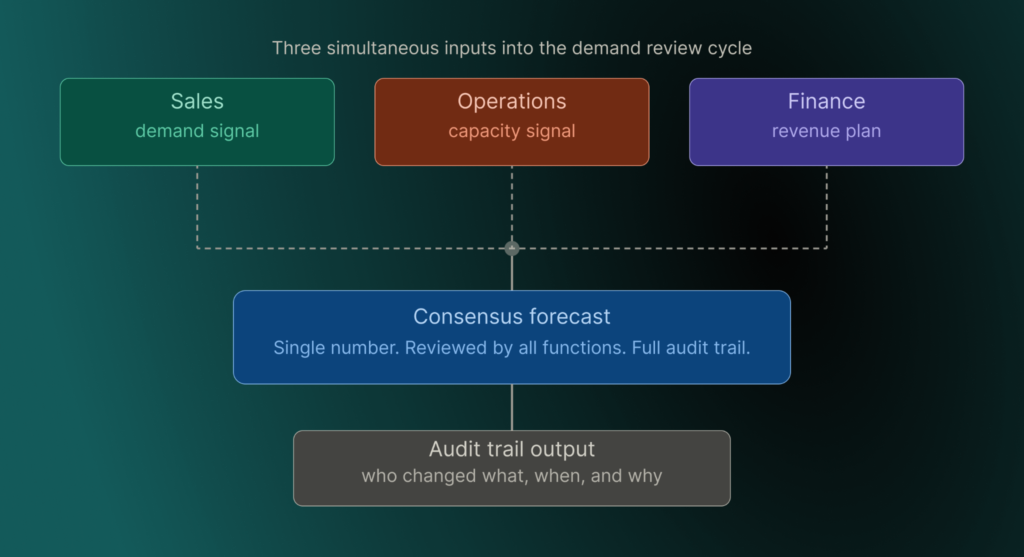
Most demand planning software is architecturally designed for multi-stakeholder input. The forecasting engine aggregates simultaneous signals from sales, finance, and operations, applies statistical weighting to each, and produces a consensus output.
If one demand planner is consolidating numbers from three separate Excel files and entering them as a single input stream, the collaborative architecture of the platform is entirely unused.
The single-planner dependency problem is one of the most common behavioral failures in these implementations.
When one planner manually consolidates a sales estimate from one spreadsheet, an operations capacity figure from another, and a finance revenue target from a third, the aggregation is sequential and manual.
The platform becomes an output formatter, not a forecasting engine.
What collaborative forecasting actually requires inside the tool:
- Simultaneous input from sales (customer-level demand signals and forward orders), finance (period revenue targets by product family), and operations (confirmed production capacity per planning period), all entered within the same planning cycle.
- Role-based input permissions so each function can only modify their assigned inputs, preventing overrides that contaminate the consensus.
- A forecast override workflow with mandatory commentary fields, so every deviation from the statistical baseline is explained and fully auditable.
A Gartner study found that 55% of organizations rate integrated business planning as highly valuable to their overall supply chain performance.
The organizations that rate it highest are those where the demand plan and the financial plan are owned and reviewed in the same system by all functions simultaneously.
Step 3: Design Your S&Op Cadence Inside The Software, Not Around It
The most common sales and operations planning (S&OP) failure is this: the company designs a monthly planning cycle, then uses the forecasting platform to generate slides for the meeting.
The software produces the report. Humans prepare the agenda. The meeting reviews what the system already flagged.
At this point, the tool is expensive slide-generation software.
A software-driven S&OP process is structured differently. The system owns the first three steps of every planning cycle:
- Statistical forecast generation: the system runs automatically on schedule. No human input is required at this stage.
- Demand review: planners review the system-generated forecast, enter overrides with mandatory commentary, and the system records every change.
- Supply review: the system checks the demand signal against confirmed production capacity and surfaces gaps automatically.
- Pre-S&OP review: the system generates the exception list. Planning leadership makes decisions on flagged items only.
- Executive S&OP: the system produces the summary report. Decisions are documented inside the platform, not in a separate slide deck.
The distinction between software-driven and software-supported S&OP is where the meeting agenda comes from.
In a software-driven process, the system surfaces the SKUs, customers, and distribution nodes with the highest forecast deviation and tells the team what requires a decision.
In a software-supported process, the human prepares the agenda manually and the software generates the output slides. Only the software-driven structure extracts full platform value.
A practical software-driven S&OP cadence for mid-market manufacturers:
- Weekly exception review: 15 to 20 minutes. System-generated exception list drives the agenda. No slides, no Excel exports. Decisions documented inside the platform.
- Monthly demand review: 2 to 3 hours. Software-driven agenda, overrides entered in-system with mandatory commentary.
- Monthly executive S&OP: 60 to 90 minutes. System-generated summary report. All decisions recorded in the platform.
| Companies moving toward continuous planning, where software monitors key performance indicators in real time and flags exceptions as they occur, are best positioned to respond when conditions shift. McKinsey, 2024, cited by DecisionBrain, April 2026 (https://decisionbrain.com/supply-chain-planning-software-integrating-sop-demand-planning-and-network-design/) |
Step 4: Use The Software To Manage Exceptions, Not Generate Reports
A demand planning software report tells you what happened in the period just closed. An exception alert tells you what is about to go wrong, with enough lead time to act.
The primary value of the platform is in exception alerts, not report generation. Most companies use it for reports.
Exception management in a functioning planning environment means three specific alert types are configured and calibrated:
- Forecast accuracy deviation alert: triggered when any top-30 SKU by revenue shows a forecast error exceeding plus or minus 15% against actual demand.
- Inventory breach alert: triggered when any distribution node is projected to fall below its safety stock threshold within the planning horizon.
- Demand signal divergence alert: triggered when a key account’s actual demand diverges from the statistical forecast by more than 20% for two consecutive weeks.
These three alerts, configured for your specific SKU segmentation and service level targets, replace a monthly report review meeting with a weekly 15-minute exception review.
No PowerPoint preparation. No Excel exports. The discussion happens inside the platform, with decisions documented in the system.
The most common configuration mistake is leaving alert thresholds at system defaults.
Default thresholds produce either alert fatigue, where too many alerts cause planners to stop reading them, or near-zero visibility, where thresholds are too wide to catch real deviations.
Thresholds must be calibrated to the business’s demand volatility profile and SKU mix.
This means AI-driven demand planning solutions can reduce forecast errors by 30 to 50% and cut lost sales due to stockouts by up to 65% (McKinsey, cited by ToolsGroup, January 2026).
These improvements are only realized when the organization is structured to act on mid-cycle exception alerts, not just to read end-of-period reports.
| Demand planning software generates its highest value not from monthly reports but from mid-cycle exception alerts that give planners enough lead time to act before a stockout or surplus occurs. Oritiq, AI-Powered Supply Chain Planning Platform |
Step 5: Connect Demand Plans To Production And Procurement Execution
Most supply chain demand planning software implementations stop at the forecast. The forecast is generated, reviewed, approved, and then exported to a spreadsheet.
The operations team reviews that spreadsheet and manually enters production targets into a separate system. At this point, the demand plan has no execution power.
Any change to the plan after that handoff does not automatically update the production schedule. Any deviation in actual production output does not automatically update the demand model.
This is the planning-to-execution gap, and it is where the largest share of value disappears in a demand planning software deployment.
What connected planning means in practice: the demand plan generated in the planning system passes the demand signal directly to Material Requirements Planning (MRP) or production scheduling without a manual handoff.
Actual production output flows back into the demand model as a feedback signal. The two systems communicate continuously, not at the end of the month.
ERP systems alone cannot close this gap. ERPs are transactional systems. They record what happened. The demand plan defines what should happen.
The gap between these two is the execution layer, which neither system fully covers on its own.
A planning layer that sits between the ERP and the operational floor, passing demand signals to production and pulling actuals back into the forecast model, is what closes it.
The practical connection checklist for mid-market manufacturers:
- Bi-directional ERP integration: the demand plan pushes to MRP, and production actuals pull back to the planning system automatically.
- Daily or near-daily data synchronization between planning and execution, not monthly batch transfers.
- Exception alerts triggered when production actuals deviate from the plan by a defined percentage threshold, not discovered manually at month-end.
| Oritiq’s platform covers the full chain from demand planning through production scheduling and procurement execution, eliminating the manual handoff between planning and operations that most mid-market manufacturers currently manage through spreadsheets. Oritiq Platform, End-to-End Supply Chain Planning |
What Integrated Business Planning Software Adds To Demand Planning
Demand planning software generates a forecast for specific SKUs or product families.
Integrated business planning software connects that forecast to financial planning, supply planning, and production execution in one platform, visible to all functions simultaneously.
A change in the demand forecast automatically ripples into the financial model and the production plan without a manual reconciliation step.
Five capabilities distinguish integrated business planning software from standalone demand planning software:
- Cross-functional collaboration in one platform: role-based input permissions for sales, finance, and operations within a single planning environment.
- Demand-to-financial reconciliation: the demand plan and the revenue plan are aligned within the same planning cycle, not reconciled manually after the fact.
- Scenario modeling across all functions: leadership can evaluate the financial impact of a demand change before committing to a production decision.
- Execution-level connection: demand plans flow to production scheduling and procurement with bi-directional data, not one-way exports.
- Native master data management: input data is organized and validated within the platform without a separate integration project.
Oritiq is an end-to-end supply chain planning platform that covers demand planning software, inventory optimization, S&OP, and production execution in a single platform, with native master data management built in.
It is designed for mid-market manufacturing companies where data quality, collaborative planning, and execution connection are unresolved with their current ERP-only setup.
For manufacturers evaluating whether their current setup covers all five steps in this guide, a platform demonstration is the most direct path to an answer.
Frequently Asked Questions
What is the most common reason demand planning software fails to deliver forecast accuracy improvements?
The most common reason is dirty or inconsistent master data fed into the system before implementation.
Demand planning algorithms are only as reliable as the historical demand baseline they analyze.
If that baseline includes returns, cancellations, promotional spikes counted as baseline demand, or duplicate SKU records, the forecast will be mathematically precise but operationally useless.
Cleaning master data before onboarding the software is the single most critical pre-implementation step.
How long does it take to see measurable ROI from demand planning software?
Most organizations require 6 to 12 months of consistent use before measurable forecast accuracy improvements appear in their data.
AI-driven demand forecasting can reduce forecast errors by 30 to 50%, but only when the organization has completed master data cleanup, adopted collaborative multi-stakeholder forecasting, and connected demand plans to execution.
The software is the enabler. The process changes are the result.
What is the difference between demand planning software and integrated business planning software?
Demand planning software generates a statistical forecast for specific SKUs or product families based on historical demand and demand sensing inputs.
Integrated business planning (IBP) software connects that forecast to financial planning, supply planning, and production execution in one platform, visible to all functions simultaneously.
IBP does not replace demand planning. It extends the demand plan into a cross-functional decision-making system where a change in forecast automatically updates the financial plan and the production schedule.
Can demand planning software work with unclean or inconsistent data?
Most demand planning software cannot self-correct for systematically bad master data. Algorithms will still generate output, but that output reflects the flaws in the input data.
Platforms with native master data management capabilities, which auto-organize and validate item and customer data as part of the onboarding process, significantly reduce this risk.
This is particularly relevant for mid-market manufacturers where ERP data quality is inconsistent and demand records are often spread across multiple Excel files with no version control.
How should S&OP meetings be structured when using demand planning software?
S&OP meetings should be driven by the software, not supported by it. The system should generate the meeting agenda by surfacing exceptions: the SKUs, customers, or distribution nodes with the highest forecast deviation and the most supply risk.
A software-driven S&OP cadence includes a weekly exception review (15 to 20 minutes, no slides), a monthly demand review (2 to 3 hours, software-driven agenda), and a monthly executive meeting (60 to 90 minutes, all decisions recorded in the platform).
This structure is what separates software-driven S&OP from expensive slide production.
Putting the five steps into practice
Your demand planning software was not the problem when the forecasts were wrong. It is still not the problem now.
The five changes covered in this guide, clean master data, collaborative forecast ownership, S&OP cadence built inside the platform, exception-driven planning, and execution connection, determine whether the tool earns its investment or replicates your spreadsheet problems at a higher cost.
For manufacturers ready to deploy a platform that handles master data cleanup, collaborative forecasting, S&OP execution, and production connection in one system, see how Oritiq works.